![logo bleu-blanc2.png]](https://blog.robotiq.com/hs-fs/hubfs/logo%20bleu-blanc2.png?height=40&name=logo%20bleu-blanc2.png)
Everything you need to set up, configure, program, and troubleshoot the Robotiq Smart Infeed 100: how it works, Copilot configuration, single / multi-pick / dual-infeed programming, the full script reference, physical limits, and safety.
1. What is the Smart Infeed 100?The Robotiq Smart Infeed 100 is an intelligent infeed conveyor for the Robotiq Palletizing workcell (PE and AX series) and PAL Ready. It combines a pneumatic gate with an array of box-detection sensors, so the palletizer always knows how many boxes are staged and where, without teaching pick positions or assigning/wiring sensors manually.
Because the software understands the concept of a box group (e.g. a group of two boxes), it can detect automatically whether one or two boxes are present based on the box dimensions, which makes multi-pick and advanced logic simpler and more reliable.
2. How it works- Pneumatic gate: releases boxes toward the pick zone. The gate always sends the maximum number of boxes at a time (as configured for the box group).
- Sensor array: detects box presence and position; the software derives box-group counts from this.
- Accumulation rollers: stage incoming boxes behind the gate.
- Box group concept: the software reasons in groups (1 box, 2 boxes, and so on), which is what enables no-teach multi-pick.
- Robot: Universal Robots e-Series (the Smart Infeed is e-Series only, Copilot 2.x URCap line).
- Copilot, basic Smart Infeed features: 3.38 and up.
- Copilot,
rq_get_smartinfeed_nb_box()script: 3.44.0 and up. - Gripper (for multi-pick): works best with a PowerPick Multi vacuum gripper.
4. Layout, upstream conveyor & throughputAlways run the latest Copilot, as many Smart Infeed behaviors are version-gated.
The Smart Infeed receives boxes from an upstream conveyor (your existing line). The qualified ranges below depend on the configuration.
Throughput (line speed)
- Single pick: up to 13 boxes/min
- Dual pick: up to 26 boxes/min
- Triple pick: up to 35 boxes/min
Upstream conveyor requirements
- Conveyor height (Standalone): 620 to 1030 mm. Below 620 mm or above 1030 mm is not supported.
- Conveyor height (Within Mobility Kit): 645 to 915 mm. Below 645 mm or above 915 mm is not supported.
- Motorized conveyor speed: up to 24 m/min. From 24 to 30 m/min, contact Robotiq; above 30 m/min is not supported.
- Gravity conveyor inclination: up to 5°. Above 5°, contact Robotiq.
Other layout notes
- Back-pressure limit: the maximum allowable back-pressure on the gate is 1000 N / 225 lb. More than this bends the gate plate and can stall the roller motor. Keep boxes from backing up against the gate.
- Orientation is set at order time. Smart Infeed inversion (boxes arriving on the left corner instead of the right, when facing the end stop) is not supported in the field. It must be specified when ordering. Inversion is occasionally needed on PE10 / AX10 where reach is limited. Use the configurator to validate orientation before ordering. See: Smart Infeed Inversion Is Not Supported in the Field.
Full mechanical and electrical details: Installation Guide (PCV-P01) and Instruction Manual V1.1.
5. Configuration in Copilot- Installation > URCaps > Copilot > Configuration > Add Conveyor, then configure the Smart Infeed.
- Set the correct gripper type and suction cups (same Configuration screen).
- Make sure the TCP is set up correctly.
- Box dimensions must match in BOTH places: the Palletizer node and the Smart Infeed configuration. A mismatch causes staging and detection problems.
6a. Basic / single pick
From the Palletizer node, select the conveyor from the drop-down and enter the box attributes (dimensions, payload, label orientation). Place a box in the corner and use Move Here to validate the values.
6b. Multi-pick (group of boxes)
- Configure the single box first (as above).
- Click Max boxes per grip and enter the maximum number of boxes to grip in one pick (typically 2). Two box-group configurations appear: single box and two boxes.
- Use Move Here on the two-box group to validate. The Smart Infeed knows automatically when one or two boxes are present, with no sensors to configure, connect, or declare.
- Set Grip Configuration > Automatic to optimize trajectory and avoid picking an extra box. (Switch to Custom to manage offsets yourself.)
Box length limits for multi-pick: boxes must be visible to the sensors. For 2 boxes, length should not exceed 400 mm (15.5 in); for 3 or more boxes, max length is about 240 mm per box.
Full guide: Multi Pick with Robotiq's Smart Infeed (includes video).
6c. Dual Smart Infeed (two conveyors, two pallets)
When two Smart Infeeds each feed their own pallet (commonly two SKUs at once), use two Palletizing nodes with decision logic outside the nodes. A clean, non-blocking way to do this is with two background threads that maintain a "ready" flag per conveyor. The robot only enters a Palletizing node when that side has a complete box group staged, so it never stalls inside a node waiting for boxes.
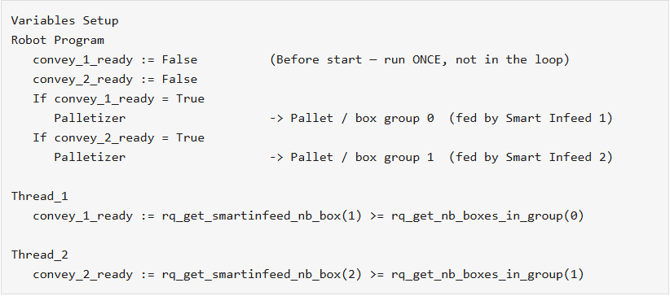
- Each thread continuously checks boxes staged ≥ boxes needed for the current group, and sets its flag accordingly.
- Mind the index offset: Smart Infeed conveyors are indexed 1 and 2, while box groups are indexed 0 and 1 (conveyor 1 feeds group 0, conveyor 2 feeds group 1).
- Initialize the flags to
Falsein BeforeStart, never inside the loop (otherwise they reset every iteration). - Pallet-full caveat: the URCap does not allow querying
rq_get_nb_boxes_in_group()once a pallet is full; doing so raises an error. Since the threads poll continuously, guard each thread so it stops evaluating once its pallet is complete.
Conceptual overview: Configuring a Palletizing Program with a Dual Robotiq Smart Infeed.
7. Script function reference
rq_get_smartinfeed_nb_box(n): number of boxes staged on Smart Infeed n. Conveyors are indexed 1, 2. Requires Copilot 3.44.0+.rq_get_nb_boxes_in_group(g): number of boxes in the current box group for pallet g. Box groups are indexed 0, 1. Do not call when the pallet is full.rq_get_nb_box_groups_done(): number of processed box groups on the current pallet.rq_get_box_group_payload(): payload of the current box group.rq_grip_uses_zone(): whether a given gripper zone is needed to grip the current group. Use inside anIffor manual zone control.rq_grip_uses_all_zones(): whether all gripper zones are needed for the current group.
The full advanced script sheet is available here: Where to find the advanced script sheet for the palletizer.
8. Tuning: gate activation delay
You can fine-tune the delay between gate sensor activation and gate valve activation (box positioning and infeed timing) with a JSON parameter, per box group:
- Installation > Features > create a point named exactly
rq_pal_json. - Program > Palletizer > Recipe > edit the box, then Configure.
- Under Additional box type JSON parameters, enter
{"infeed.gateJustificationDelay": x.x}, then replacex.xwith the delay in seconds (e.g.0.5). - Repeat per box group if different timings are needed. Always validate the timing after changes.
Full guide: Updating the Gate Activation Delay on a Robotiq Smart Infeed Conveyor.
9. Limits & best practices (summary)
- Back-pressure ≤ 1000 N / 225 lb; don't let boxes back up against the gate.
- Box dimensions must match in the Palletizer node and the Smart Infeed config.
- Multi-pick length limits: 400 mm (2 boxes) / about 240 mm (3 or more boxes).
- Upstream conveyor height: 620 to 1030 mm (standalone) or 645 to 915 mm (Mobility Kit).
- Orientation (standard vs inverted) is fixed at order time.
- Keep Copilot updated.
10. Safety & compliance
The Smart Infeed 100 was evaluated through internal CE conformity assessments. Two pinch zones were identified and judged safe to operate without additional guarding under normal operation:
- Zone 1 (downstream roller interface): the roller geometry tends to expel objects rather than draw them in; low risk.
- Zone 2 (perpendicular surface & roller ends): free-spinning end caps, a low-friction plastic motor surface, and a free-spinning center washer do not transmit torque.
For operator protection, the unit includes a position-adjustable emergency stop, with an optional second E-stop available for dual-sided access.
Full article: Safety Design and CE Assessment of Pinch Points on the Smart Infeed 100.
Related articles
- Multi Pick with Robotiq's Smart Infeed
- Configuring a Palletizing Program with a Dual Robotiq Smart Infeed
- Updating the Gate Activation Delay on a Robotiq Smart Infeed Conveyor
- Smart Infeed Inversion Is Not Supported in the Field
- Safety Design and CE Assessment of Pinch Points on the Smart Infeed 100
Need help? Contact Robotiq Support
Updated: June 2026