![logo bleu-blanc2.png]](https://blog.robotiq.com/hs-fs/hubfs/logo%20bleu-blanc2.png?height=40&name=logo%20bleu-blanc2.png)
Purpose of this article
This article explains why Smart Infeed inversion is not supported once the unit is delivered and describes the correct process for ordering an inverted configuration when required. It is intended to prevent field modification attempts and ensure the correct Smart Infeed configuration is selected upfront.
What Smart Infeed inversion means
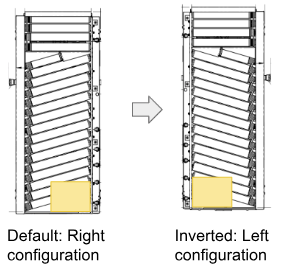
Smart Infeed inversion refers to assembling the Smart Infeed so that boxes arrive on the left corner rather than the right corner, when standing facing the end stop of the Smart Infeed.
This inverted configuration, while not common, can be required in some applications with PE10 or AX10, where robot reach is more limited.
Why Smart Infeed inversion is not supported in the field
Although it was previously communicated that inverting a Smart Infeed in the field would be “painful but possible”, a detailed review of the assembly steps confirmed that this is not a realistic or supportable option.
Inverting the Smart Infeed in the field:
-
Involves too many critical assembly operations
-
Carries a high risk of assembly errors
-
Cannot be properly validated or tested once reassembled
For these reasons, Smart Infeed inversion in the field is not supported.
What this means in practice
Orientation must be confirmed at order time
The Smart Infeed orientation must be selected correctly when the order is placed.
Use the configurator to validate the orientation
The configurator is designed to confirm the correct Smart Infeed orientation:
-
It defaults to the standard configuration, which fits the vast majority of applications
-
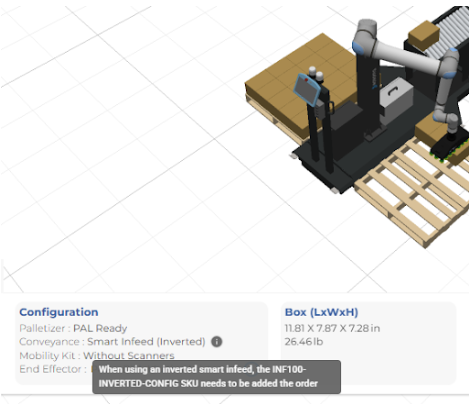
When robot reach is insufficient, the user is prompted to try changing the box alignment to the left side
-
Simulation confirms whether the left configuration works and indicates the SKU to add to the order: INF100-INVERTED-CONFIG
When to involve Product Experts
If there is any uncertainty related to robot reach limits, surrounding equipment, or layout constraints, Product Experts must be involved before placing the order to confirm the correct Smart Infeed configuration.
Important note on incorrect orders
If an incorrect Smart Infeed configuration is ordered:
-
A swap request will follow the standard return policy
-
The replacement unit will be processed as a new order
The configurator and support process are intended to help ensure the correct Smart Infeed configuration is ordered upfront and avoid this scenario.
Smart Infeed inversion cannot be performed in the field and must be defined at order time. Using the configurator, validating the configuration through simulation, and involving Product Experts when needed helps prevent unsupported modifications and ordering issues.
Need help? Contact us at https://robotiq.com/contact
Updated – February 2026