![logo bleu-blanc2.png]](https://blog.robotiq.com/hs-fs/hubfs/logo%20bleu-blanc2.png?height=40&name=logo%20bleu-blanc2.png)
When the robot places a box on the stack, the weight of the box moves from the robot flange to the pallet. If the payload setting drops abruptly while the robot still feels the weight of the box (or the push of the blowoff), the forces it measures do not match its payload and it can trigger a protective stop.
This article walks through an example Release Sequence used with a PowerPick gripper. It is not the only valid setup: use it as a starting point and adapt the values to your boxes, cups and cycle time. It combines three elements:
- A progressive payload change with
rq_use_payload_no_box() - A compliant Force Control node
- A timed release with the PowerPick Release node
The same structure works with other Robotiq grippers: keep the script and the Force Control node, and replace the PowerPick Release node with the release node of your gripper.
Program structure
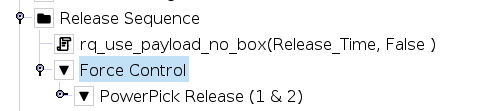
Step 1 – Start the payload transition
Add a Script node at the top of the Release Sequence with:
rq_use_payload_no_box(Release_Time, False)
- Transition time (
Release_Time): duration of the payload transition, in seconds - Blocking (
False): the program does not wait for the transition to end. It keeps going with the next lines, so the payload drops while the gripper releases the box
The function brings the payload back to the value set for the empty end effector, the same as before the pick.
In this example, Release_Time is a variable set to the same duration as the Fixed wait duration of the release node in Step 3. Mind the units: the release node uses milliseconds and the script uses seconds, so a 150 ms wait gives Release_Time = 0.15. Keeping both in one variable makes it easy to tune the release time in a single place.
Note: The complete description of every palletizing script function is in the PalAdvancedProgrammingFunctions.pdf file, packaged in the same ZIP folder as the Copilot URCap, available on the Robotiq support website.
Step 2 – Configure the Force Control node
Insert a Force Control node right after the script, and place the PowerPick Release node inside it.
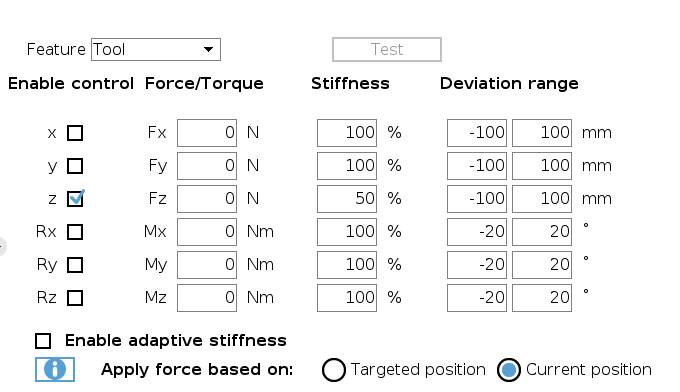
With 0 N on a compliant Z axis, the robot does not push on the stack: it follows the small movements caused by the weight leaving the gripper and by the blowoff, instead of fighting them.
Step 3 – Configure the PowerPick Release node
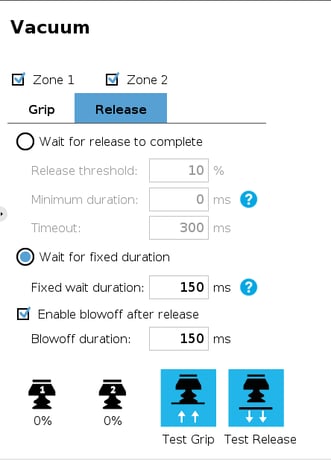
In this example, the Fixed wait duration is 150 ms, the same as Release_Time.
Tip: The other release mode, Wait for release to complete, ends the node when the vacuum falls under a release threshold. This example uses a fixed duration instead, so the release always lasts as long as the payload transition of Step 1.
The blowoff pushes air through the cups after the release, so they do not stick to the box.
Adapting the example
- Heavier boxes or protective stops at release: give the payload more time by raising
Release_Timeand the Fixed wait duration together. - Cups sticking to the box: lengthen the Blowoff duration.
- Another gripper: keep Steps 1 and 2, and set the release of your gripper inside the Force Control node.
Conclusion
A progressive, non-blocking payload change, a compliant Force Control node and a release timed on the same duration let the weight of the box move to the stack smoothly, without a jolt on the robot.
Learn more:
- How to Use Contact Detection in Robotiq Palletizing Applications
- Smooth Payload Transition During the Grip with a PowerPick Gripper
Need help? Contact Robotiq Support.
Updated: October 22, 2026