![logo bleu-blanc2.png]](https://blog.robotiq.com/hs-fs/hubfs/logo%20bleu-blanc2.png?height=40&name=logo%20bleu-blanc2.png)
The FT-300 S Force Torque Sensor uses capacitance-based deformation measurements to detect forces and moments applied to the tool. Proper calibration is critical to account for tool mass, mounting stresses, and drift, ensuring accurate sensor data in your robot’s application. Calibration data is stored permanently in the sensor and influences readings on all future startups.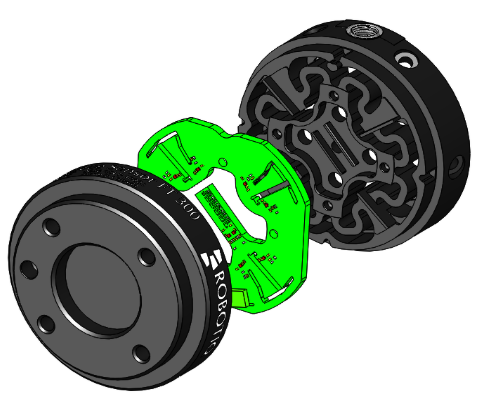
How the FT-300 S works
-
A spring-like plate inside the FT-300S deforms under load, altering the distance between the plate and the PCB.
-
This deformation changes the capacitance, which the PCB electronics measure and convert into force and torque readings.
What calibration does
Calibration compensates for several factors:
-
Mass and center of mass of the sensor + tool
-
Pre-load from mounting screws or coupling stress
-
Signal offsets due to drift (via a temporary “Zero sensor” offset)
After the calibration is completed, these adjustments are saved to the sensor’s permanent memory, affecting all future readings.
Performing calibration
You can calibrate via:
-
Visual Demo Software (PC): Use the “Tool Calibration” tab, then review readings in the “Sensor Data” tab.
- Download the Visual Demo Software
- Universal Robots (UR) Dashboard:
-
-
Navigate in PolyScope to Program Robot → Installation → FT Sensor.
-
Open the Calibration tab.
-
Launch the calibration wizard.
-
Follow prompts to orient the sensor’s axes downward:
-
X axis pointing down, then confirm → Y axis pointing down → Z axis pointing down.
-
-
View payload and center of gravity in the Calibration menu.
-
Zeroing the sensor before every force event
Use the Zero Sensor node as a temporary offset to compensate for signal drift when performing sensitive tasks like surface detection, force insertion, etc.
When to Recalibrate
Recalibrate whenever:
-
The sensor is installed or reinstalled on a robot arm.
-
A new end effector is mounted.
-
Mounting screws or tool changes may shift the mass or stress on the sensor.
Conclusion
Proper calibration of the FT-300 S Force Torque Sensor ensures accurate, drift-free force and torque readings for your robot application. By accounting for tool mass, mounting stress, and signal offset, calibration improves sensor reliability across all sessions. Use the “Zero Sensor” function before each precision task and recalibrate anytime the tool setup changes.
Robotiq FT-300 S Instructions Manual
Need help? Contact Robotiq Support.
Updated: August 25, 2026