![logo bleu-blanc2.png]](https://blog.robotiq.com/hs-fs/hubfs/logo%20bleu-blanc2.png?height=40&name=logo%20bleu-blanc2.png)
Context :
When working with the Robotiq Palletizing Solution, the recipe drop‑down menu in the Palletizer node can become long and difficult to navigate if you have many recipes. This can slow down operators, lead to errors in selection, and make maintenance more cumbersome. The following methods help simplify recipe management and improve workflow efficiency
Option 1: Recommended : Split Recipes Across Multiple Programs
To simplify navigation, you can split your recipe setup into several robot programs. Each program can then contain a shorter, more manageable recipe list in its drop-down menu.
-
Easy to implement and maintain
-
Reduces clutter in each program
-
Recommended when operator input is required for recipe selection
Option 2: Automate Recipe Selection via Script and PLC
For automated workflows, a script-based workaround allows the robot to select the recipe based on external input, such as a PLC signal sent through Modbus.
This approach uses a legacy script that is not officially supported by Robotiq and must be tested thoroughly before deployment.
Runtime Behaviour
-
On robot startup when the pallet is empty, the recipe can switch automatically based on the PLC Modbus signal.
-
If the pallet already contains boxes, the Palletizer node’s current recipe takes priority (useful for recovery after interruptions).
-
After completing a pallet, the script can re‑check PLC values and update the recipe accordingly.
Script Functionality
In this workaround, the left_recipe and right_recipe variables are linked to Modbus register statuses. In the provided example, output registers and the robot’s local address (127.0.0.1) are used for testing purposes.
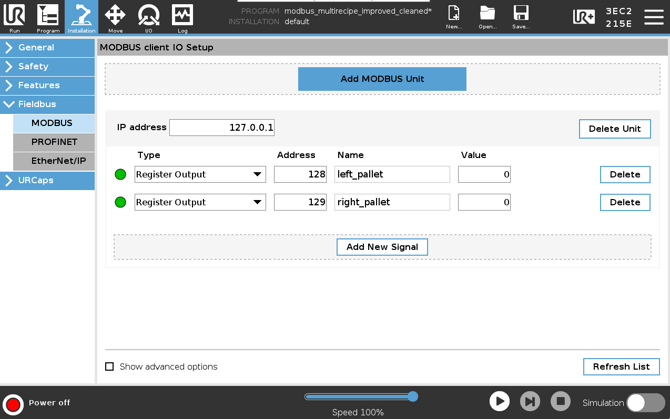
Values from these registers are fed to the dynamicRecipeChange() script function :
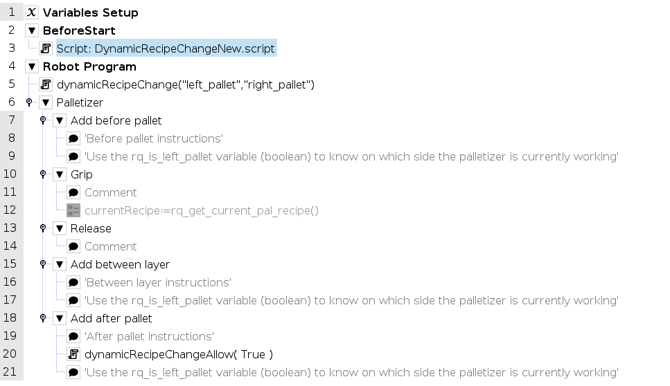
The function dynamicRecipeChangeAllow(True) must be placed in the “Add after pallet” section of the palletizer node.
The DynamicRecipeChangeNew script file also contains the get_PLC_values() function:

Since Modbus limits values to numbers, the PLC input can be formatted using str_cat() to build a recipe name by adding letters.
Alternatively, if statements can be used to associate a numerical value with a specific recipe name.
Script Download
The script is available here:
Download DynamicRecipeChange Script
Conclusion
To manage a large number of recipes efficiently, you can either divide them across multiple programs or automate recipe selection using a PLC and custom script. Choose the method that best matches your operational needs and technical resources.
Need help? Contact us at support@robotiq.com
Updated: January 2026