![logo bleu-blanc2.png]](https://blog.robotiq.com/hs-fs/hubfs/logo%20bleu-blanc2.png?height=40&name=logo%20bleu-blanc2.png)
This article provides guidance on integrating Robotiq grippers with TM/Omron S-Series robots using TM Flow 2.0. It focuses on using a direct MODBUS RTU connection via the robot's wrist, supported by Robotiq's dedicated coupling and software component.
1. Integration Overview
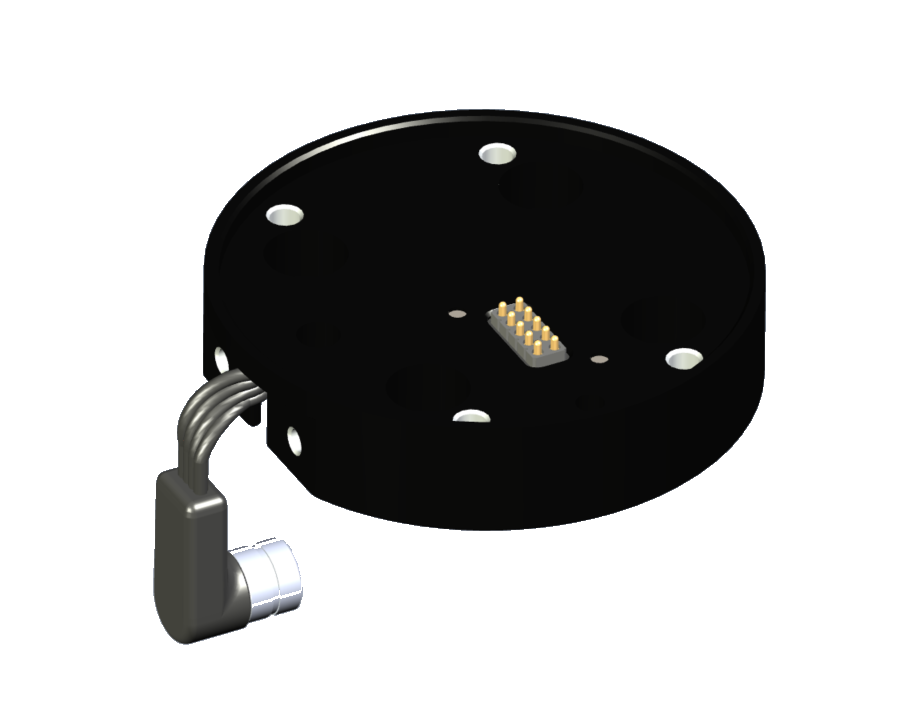
The TM/Omron S-Series uses TM Flow 2.0, which supports MODBUS RTU communication directly through the robot’s wrist. Robotiq offers a dedicated coupling designed to simplify this integration.
-
Communication Protocol: MODBUS RTU
-
Robot Controller: TM Flow 2.0
-
Connection Type: Wrist-mounted via MODBUS RTU port
2. Required Components
To complete the integration, you'll need the following hardware and kits:
-
Coupling SKU: GRP-SS-CPL-078
-
Integration Kits (hardware + software included):
-
AGC-OMRON-S-KIT-140
-
AGC-OMRON-S-KIT-85
-
HND-OMRON-S-KIT
-
VAC-OMRON-S-EPICK-KIT1
-
These kits include the necessary accessories to physically and electronically connect the gripper to the robot.
3. Software Setup
To enable communication between the gripper and robot:
-
Download and install the TM Component specifically designed for the TM/Omron S-Series.
-
This component facilitates command and data flow through MODBUS RTU.
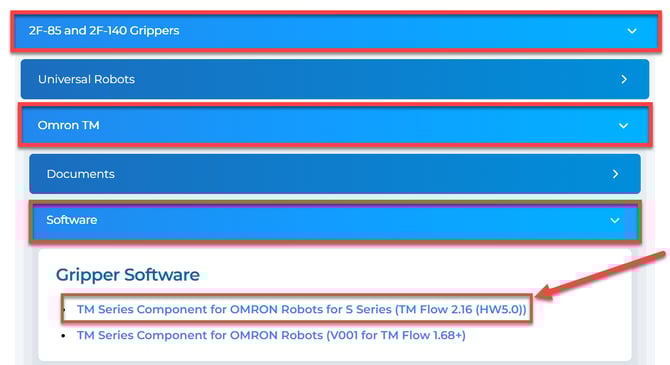
You can download it from the Robotiq Support Portal: select your gripper model, then go to Software > Gripper Software, and pick the component version that matches your TM Flow version.
4. Documentation Access
Comprehensive setup and configuration details are included in the documentation for the TM Component. This includes:
-
Node descriptions
-
Connection diagrams
-
Usage examples
All documentation is available on the Robotiq Support Portal.
Conclusion By using the Robotiq coupling and TM Component, integrating your gripper with TM/Omron S-Series robots is straightforward. For detailed guidance, refer to the downloadable component documentation. Need help? Contact Robotiq Support.
Updated: August 14, 2026