![logo bleu-blanc2.png]](https://blog.robotiq.com/hs-fs/hubfs/logo%20bleu-blanc2.png?height=40&name=logo%20bleu-blanc2.png)
Robotiq provides URCaps, plugins, and templates for several major robot brands. If your robot is not listed under the product section of our Support page, you can still integrate Robotiq grippers and sensors using standard industrial methods.
This article walks through the three steps to a working integration:
- Mechanical compatibility: mounting your Robotiq product to the robot flange
- Communication setup: connecting your robot controller to the device
- Software control: commanding the device from your robot program
The same approach works across a wide range of robots and industrial protocols.
1. Mechanical Connection
Start with your robot's flange drawing and identify three things:
- PCD (Pitch Circle Diameter): e.g., 31.5 mm, 50 mm
- Bolt pattern: number of holes and screw size, e.g., 4 x M5, 6 x M8
- Connector type at the tool flange (if any): M8 male, M8 female, or none
Example of flange drawing:
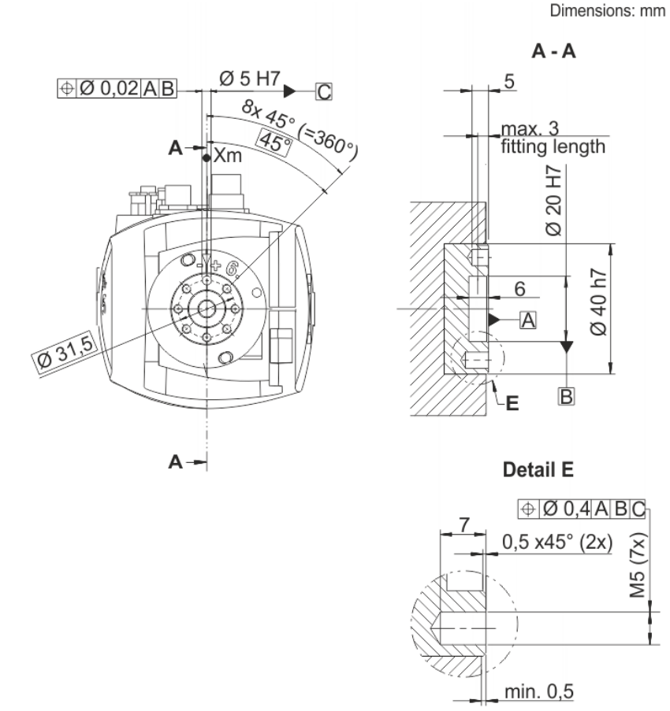
Match this to one of the standard ISO flanges in the Coupling table below (Section 4. Parts to order). If your flange does not match a standard, two options are available:
- Blank coupling (GRP-CPL-BLANK): You machine the robot-side holes yourself. See: Blank Coupling.
- Dedicated adapter plate: Robotiq stocks adapter plates for many non-standard robot flanges. The adapter plate pairs with one of our standard couplings. Contact Robotiq with your robot model to confirm the right combination. The full list of covered robots and their connection kits is in the Generic Robot Connection Kit guide.
Note on connector compatibility: even when the flange standard matches, the connector at the tool flange may have a different gender (male vs female M8) than what the Robotiq coupling cable expects. In that case, you cannot mate directly through the flange. Instead, route the gripper communication cable to the robot base or controller (see Section 2).
2. Communication Protocols
Robotiq devices (2F-85, 2F-140, Hand-E, Hand-E C10, EPick, FT-300-S) communicate using Modbus RTU over RS-485.
If your robot controller supports Modbus RTU natively - connect directly. Use the Modbus parameters (baud rate, parity, slave ID) from the device's instruction manual.
If your robot controller does not support Modbus RTU - bridge the communication with a Robotiq Universal Controller. Available protocols: CANopen, DeviceNet, EtherCAT, Ethernet/IP, Modbus TCP, ProfiNET. The robot controller talks to the Universal Controller, which talks to the gripper. (Universal Controller SKUs and required configuration files are listed in Section 4.)
Special case - FT-300 Force Torque Sensor: the FT-300-S cannot use the Universal Controller. For non-Modbus RTU robots, use a third-party protocol converter such as Anybus.
3. Software Control
Robotiq devices are controlled by reading and writing registers over the Modbus connection:
- Writing to a command register - open/close gripper, set force or speed
- Reading a status register - check object detection, current position, fault codes
The full register map for each product is available in its instruction manual. You implement the control logic directly in your robot's programming environment.
4. Parts to order
- Gripper
Product Sku 2F-85 AGC-GRP-2F85 2F-140 AGC-GRP-2F140 Hand-E HND-GRP Hand-E C10 HND-GRP-C10 EPick VAC-GRP-EPICK FT-300-S FTS-300-S-KIT-001 - Coupling
For grippers (2F-85, 2F-140, Hand-E, Hand-E C10, and EPick):
For the FT-300 S:Robot flange standard Coupling SKU ISO 9409-1-31,5-4-M5 GRP-CPL-063 ISO 9409-1-40-4-M6 GRP-CPL-064 ISO 9409-1-50-4-M6 GRP-CPL-062 ISO 9409-1-56-8-M4 AGC-CPL-065-002 Other (non-standard) Two options: (1) blank coupling GRP-CPL-BLANK(machine your own holes), or (2) one of the standard couplings above paired with a dedicated adapter plateAGC-APL-XXX-002. Contact Robotiq with your robot model to confirm the right combination.Robot flange standard Coupling SKU ISO 9409-1-31,5-4-M5 FTS-300-S-CPL-029 ISO 9409-1-40-4-M6 FTS-300-S-CPL-030 ISO 9409-1-50-4-M6 FTS-300-S-CPL-014 8 x M3 on 39 mm PCD FTS-300-S-CPL-031 Other (non-standard) Two options: (1) blank coupling FTS-300-S-CPL-BLANK(machine your own holes), or (2) one of the standard couplings above paired with a dedicated adapter plateAGC-APL-XXX-002. Contact Robotiq with your robot model to confirm the right combination. - Cables
Component SKU RS-485 Converter ACC-ADT-USB-RS485 10-meter communication cable CBL-COM-2065-10-HF - Protocol of communication
- For grippers: The Universal Controller bridges Modbus RTU to your robot's protocol when your robot does not support Modbus RTU natively.
Robot protocol Universal Controller SKU Modbus RTU (native) Not required CANopen UNI-CTR-001-CANO DeviceNet UNI-CTR-001-DNET EtherCAT UNI-CTR-001-ECAT Ethernet/IP UNI-CTR-001-ENIP Modbus TCP UNI-CTR-001-MTCP ProfiNET UNI-CTR-001-PNET Configuration files for the Universal Controller: Depending on the protocol, configuration files are required to declare the Universal Controller on your robot's network. Robotiq provides:
- EDS files for DeviceNet and Ethernet/IP
- ESI (XML) file for EtherCAT
- GSDML file for ProfiNET
These files are available on the Robotiq support website. Navigate to: [Product] → Other brands → Software → Universal Controller Configuration.
- For the FT-300 :
Robot protocol Solution Modbus RTU (native) Not required Other protocols Use a third-party protocol converter (e.g., Anybus)
- For grippers: The Universal Controller bridges Modbus RTU to your robot's protocol when your robot does not support Modbus RTU natively.
Conclusion
Robotiq gripper or sensor can run on virtually any robot with three pieces in place: the right mechanical mount, a Modbus RTU connection (direct or via Universal Controller), and the register-level control logic in your robot program.
Need help confirming the right parts for your specific robot? Contact Robotiq Support. Send us your robot model and flange drawing, and we will confirm the coupling, adapter plate, and Universal Controller (if needed) you should order.
Updated: August 25, 2026