![logo bleu-blanc2.png]](https://blog.robotiq.com/hs-fs/hubfs/logo%20bleu-blanc2.png?height=40&name=logo%20bleu-blanc2.png)
Designing a cell, preparing a risk assessment or completing an import file all start with the right document. Most Robotiq files (3D models, drawings, manuals, schematics and declarations) are published on the Robotiq Support site and can be downloaded in a few clicks. A few documents are tied to a specific unit or shipment: Robotiq Support issues those on request.
Finding a File on the Robotiq Support Site
-
Go to the Robotiq Support site.
-
Select your product (for example 2F-85 and 2F-140 Grippers, Hand-E Adaptive Gripper, Vacuum Grippers, Palletizing Workcell).
-
Select your robot brand. Manuals, couplings and software depend on the robot you use.
-
Open the section you need: Documents, 3D Models or Software.
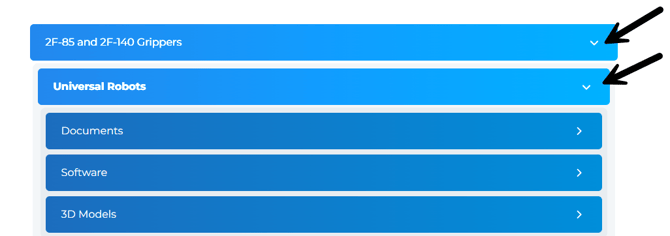
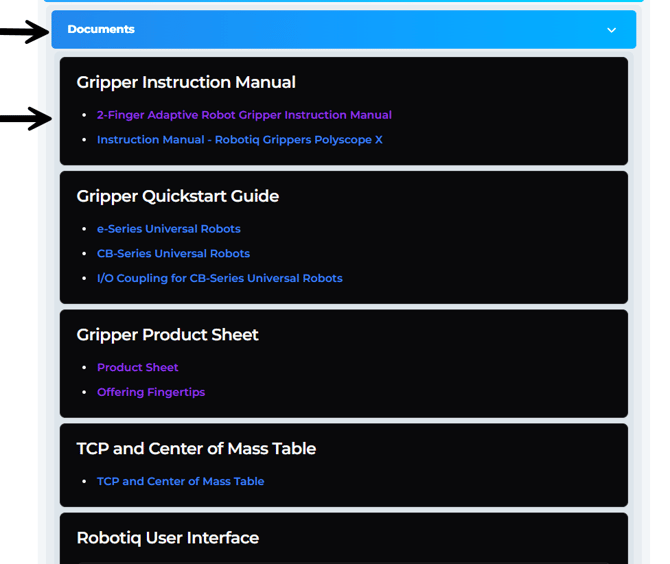
TIPS :Some 3D models are bundled together and download as a single file. If a file seems to be missing, check that the robot brand you selected matches yours: many files only appear for the robot they apply to.
CAD Files and Drawings
-
3D model of a gripper, sensor or camera (STEP): 3D Models > Product CAD
-
Fingers, fingertips and holders (STEP): 3D Models > Product CAD
-
Couplings and adapter plates (STEP): 3D Models > Mounting CAD
-
Dual gripper adapter plates (CB-Series and e-Series UR) and dual gripper configurations (STEP): 3D Models > Mounting CAD and Product CAD
-
Simplified (defeatured) Hand-E P7L model (ZIP): Hand-E Adaptive Gripper > 3D Models > Product CAD
-
2D drawings of the 2F-85, 2F-140, Hand-E, EPick and Wrist Camera (PDF): 3D Models > 2D Drawings
-
Palletizing Workcell work zones and layout, AX and PE series (editable DWG): Palletizing Workcell > 3D Models > Work Zones and Layout
-
TCP and center of mass (PDF): Documents > TCP and Center of Mass Table
Electrical Schematics
Electrical schematics for the Palletizing Workcell (AX and PE series, Smart Infeed 100) are available in the Documents section as PDF files. Select the schematic that matches your unit's serial number range.
Manuals and Languages
-
Instruction manuals and quickstart guides are published in English, with one version per robot brand when the integration differs.
-
EC/EU declarations are available in English (original), French, German, Italian and Spanish, plus a UK declaration, for most products. You will find them in the Standards, Declarations and Certificates section of each product.
Certificates and Compliance Documents
-
CE, EC/EU declarations, RoHS, REACH, UL, conflict minerals and certificates of origin: see Finding the Harmonized Standards, Declarations, and Certificates.
-
IP67 test certificates for the Hand-E gripper and the Wrist Camera are available in their Standards, Declarations and Certificates section.
Documents to Request from Robotiq Support
Some documents are issued per unit or per request. Contact Robotiq Support and include the information listed below.
-
Product authenticity confirmation: the product's serial number
-
Quality certificate for a 2F or Hand-E gripper: the gripper's serial number
-
Certificate of origin and HS code: the product's part number and the destination country
-
Other regulatory declarations (for example, packaging regulations): the regulation name and the products concerned
Conclusion
The Support site always holds the latest version of each file, so download a fresh copy rather than reusing an old one.
Can't find a file? Contact Robotiq Support.
Updated: November 4, 2026