![logo bleu-blanc2.png]](https://blog.robotiq.com/hs-fs/hubfs/logo%20bleu-blanc2.png?height=40&name=logo%20bleu-blanc2.png)
Context
This article helps troubleshoot a situation where the robot reaches the pick position but fails to pick a box. The issue is usually linked to the box detection sensor not sending the correct signal to the robot.
Possible Causes
The robot will only attempt to pick a box if the box is detected by the dedicated sensor. The following conditions can prevent proper detection:
-
The sensor's sensitivity is not adjusted correctly.
-
The sensor’s Light-on / Dark-on switch is in the wrong state.
-
The sensor’s signal is not connected to the expected robot Digital Input (DI).
-
The sensor is not powered with a proper 24 V supply.
-
The sensor or its cable is damaged and cannot deliver the detection signal.
Troubleshooting Steps
-
Adjust the sensor sensitivity and Light-on / Dark-on switch
-
Place a box at the pick location.
-
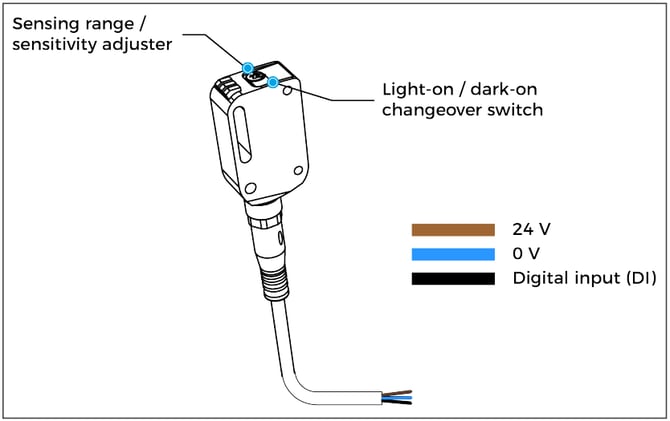
Turn the sensor’s adjuster and switch until the yellow LED turns ON, indicating detection.
-
-
-
Verify sensor wiring and connections
-
Ensure that:
-
Brown wire = 24 V
-
Blue wire = 0 V
-
Black wire = Digital Input (DI)
-
-
Refer to the diagram above to validate the wiring.
Note: The robot controller must be powered ON to supply 24 V to the sensor.
-
-
Check which DI is used in the program
-
Go to Installation → I/O Setup.
-
Place an object in front of the box sensor.
-
Check if the expected DI changes state.
-
Confirm this DI matches the one used in the Palletizing node of the robot program.
-
-
Inspect for physical damage
-
If the yellow LED never turns on despite all adjustments:
-
The sensor or cable might be defective.
-
Contact Robotiq Support for further assistance.
-
-
Conclusion
If the robot doesn't attempt to pick a box, the issue is likely related to the box detection sensor setup or wiring. Follow the steps above to validate sensitivity, wiring, and input configuration. Still having trouble? Contact Robotiq Support.
Updated: August 13, 2026