![logo bleu-blanc2.png]](https://blog.robotiq.com/hs-fs/hubfs/logo%20bleu-blanc2.png?height=40&name=logo%20bleu-blanc2.png)
Not every integration goes through a teach pendant. Integrators and developers who write their own control software, run a robot outside the standard platforms, or validate a cell in simulation need direct access to the code.
Robotiq publishes that software openly, and indexes it in one place: the Robotiq developer site. This article tells you where to look, and how support works for what you find there.
Start at the Developer Site
Everything starts at robotiq.github.io, the index Robotiq maintains for its developer software. It is updated as drivers are added or revised.
Use it as your entry point rather than browsing the source repositories directly. It tells you which integration exists for your product before you go looking for code.
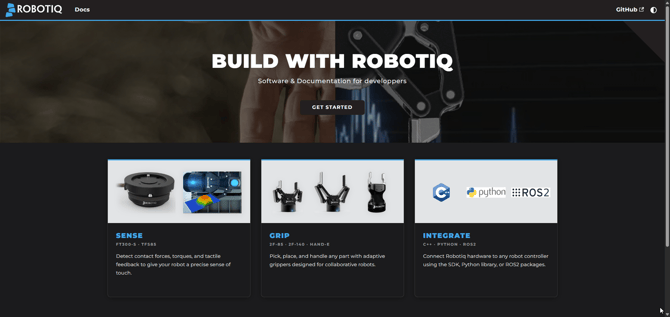
How the Site Is Organized
The site is organized by product rather than by technology, so you can start from the hardware you actually have.
- Overview: a single table listing, for each product, the available SDKs and programming languages, the ROS support, the simulation and physics engine integrations, and related projects.
- Drivers: one page per product family, currently the 2F and Hand-E grippers, the TSF-85 tactile sensor fingertips, and the FT 300-S Force Torque Sensor. Each page covers installation and use for that device.
- Source code: every project links out to its repository in Robotiq's public GitHub organization, github.com/robotiq, where the code, its documentation, and its issue tracker live together.
For a fuller walkthrough of the ROS 2 side specifically, see Integrating Robotiq Grippers with ROS2
Official and Community-Maintained Integrations
Not everything listed on the site is maintained by Robotiq, and the site says so openly. Each entry in the Overview table carries a badge:
- Blue: maintained by Robotiq. Issues and questions reach the maintainers through that repository.
- Grey: maintained by the community. Often useful and well supported, but the pace of updates and the compatibility with your firmware version are outside Robotiq's control.
Check that badge before committing to an integration path, especially for a production cell. It is the fastest way to know what kind of support to expect.
Licensing and Support Model
These resources are open source, and it is worth being clear on what that means for your project.
- License: each repository carries its own LICENSE file, and projects that derive from third-party work keep their original license. Read the file in the repository you are actually using rather than assuming one license across the organization.
- Where to ask: questions specific to the code belong in that repository's issues and discussions on GitHub. That is where the maintainers and the community answer.
- What Robotiq Support covers: the hardware itself, and the officially documented integration paths. Installation and configuration of the open-source code come from the repository documentation.
- Before production: review the code, test it against your own cell, and validate the behavior for your device model and firmware version, as you would with any open-source dependency.
Conclusion
A custom or non-standard integration does not have to start from scratch. Start at robotiq.github.io, find your product, and follow the link to the code. Open an issue in the repository for anything specific to the software itself.
For questions about your hardware or your application, contact Robotiq Support.
Updated: September 15, 2026