![logo bleu-blanc2.png]](https://blog.robotiq.com/hs-fs/hubfs/logo%20bleu-blanc2.png?height=40&name=logo%20bleu-blanc2.png)
This article explains how to replace the camera cable on Robotiq systems using a compatible camera. The procedure is simple and requires only basic handling. Following the steps carefully helps ensure proper camera operation after the replacement.
Required replacement parts
Use the appropriate replacement cable based on your camera version:
-
CBL-COM-2069-10-HF – RWC Old Camera
-
CBL-COM-2075-05-HF – RWC5 New Camera
Camera cable replacement procedure
1. Remove the retaining screw
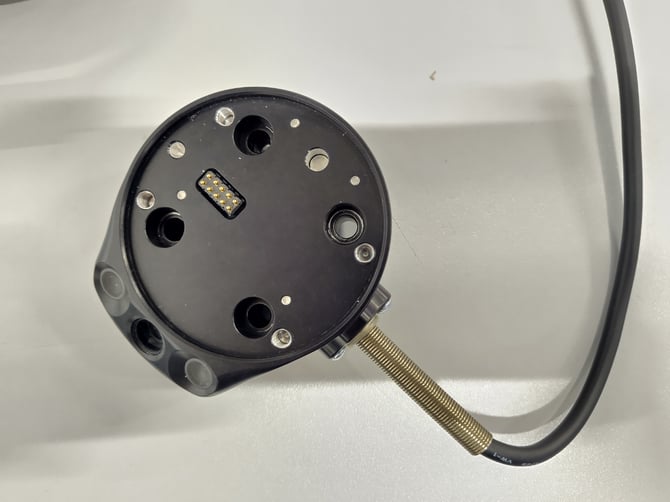
Locate and remove the screw that secures the camera cable in place.
-jpg.jpeg?width=670&height=503&name=IMG_20260129_145213%20(1)-jpg.jpeg)
-jpg.jpeg?width=670&height=502&name=IMG_20260129_145329%20(1)-jpg.jpeg)
2. Remove the existing cable
Gently pull the camera cable out of the connector.
-jpg.jpeg?width=670&height=503&name=IMG_20260129_145528%20(1)-jpg.jpeg)
3. Insert the new camera cable
Push the replacement cable into the connector. Make sure the connector is inserted in the correct orientation before fully seating the cable. Incorrect orientation may damage the connector or prevent proper operation.
4. Secure the cable
Reinstall the retaining screw to secure the cable in place.
Replacing the camera cable is a quick procedure that involves removing the retaining screw, swapping the cable, and reinstalling the screw. Always ensure the connector is oriented correctly before securing the cable to avoid connection issues.
Need help? Contact Robotiq Support
Updated: February 2026