![logo bleu-blanc2.png]](https://blog.robotiq.com/hs-fs/hubfs/logo%20bleu-blanc2.png?height=40&name=logo%20bleu-blanc2.png)
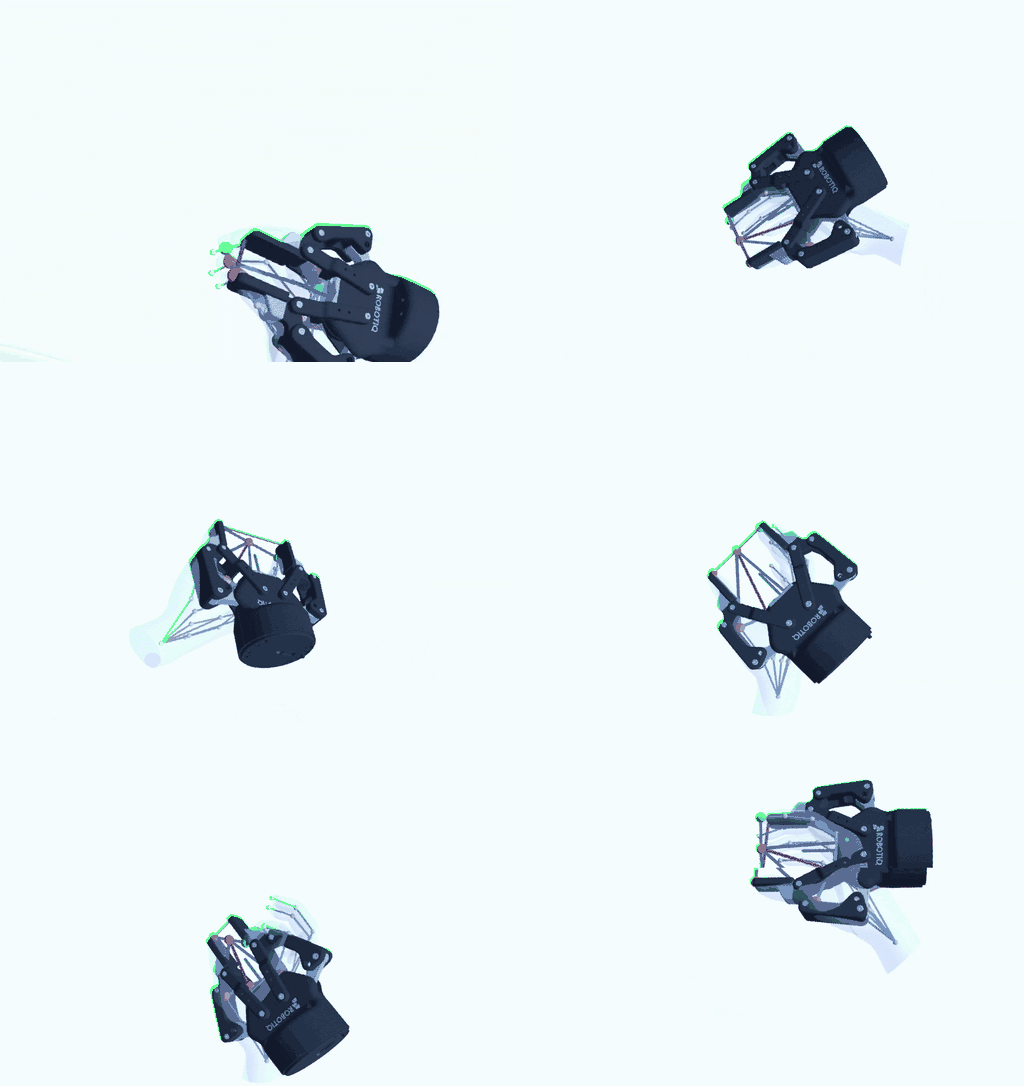
Physical AI needs demonstrations of manipulation, and people already record thousands of hours of hands doing useful work. The challenge is that a robot does not have a hand: a Robotiq 2F-85 has two parallel fingers, one opening value and a pose. For an AI, working out which gripper configuration matches a given human hand configuration is not obvious.
Attaching a virtual 2F-85 to the hand does that translation for you. For every frame of a video, you get:
- the gripper pose (position and orientation)
- the gripper opening, from 0 to 85 mm
This turns videos of people at work into data an AI can learn from, which makes it easier to teach a robot a task by showing it how a person does it.
What is a Hand Armature?A hand armature represents the human hand as a simple skeleton: its bones become segments, and its articulations become joints between those segments. Each joint is labelled with a letter in the figures of this article.
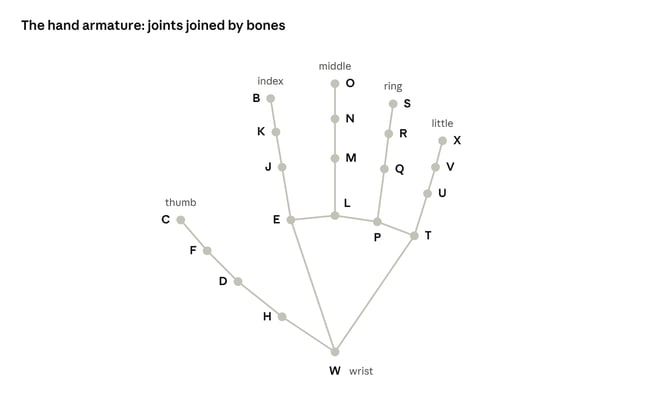
Several types of tools can detect the configuration of the hand armature in space, relative to a reference frame. Their precision depends on the detection method, and choosing the most precise one is outside the scope of this article. Here is a non-exhaustive overview:
| Source | What it gives | Notes |
|---|---|---|
| Ordinary video (webcam, phone, existing footage) | Hand joints in the image; some tools also estimate a full 3D hand | Works on videos that already exist; some tools run in real time on a CPU |
| VR / XR headset with hand tracking | 3D hand skeleton from the headset cameras | Headsets that follow the standard XR hand model give 26 joints per hand |
| Hand-tracking camera | 3D hand skeleton | Stereo infrared, on a desk or mounted on a headset |
| Depth camera | Measured depth, combined with a 2D hand detector | Depth is measured, not estimated |
| Data glove | Finger joint angles measured on the hand | No camera needed; keeps working when fingers are hidden |
| Optical motion capture | 3D marker positions, fitted to a hand | Several cameras and reflective markers; the most accurate option, used as a lab reference |
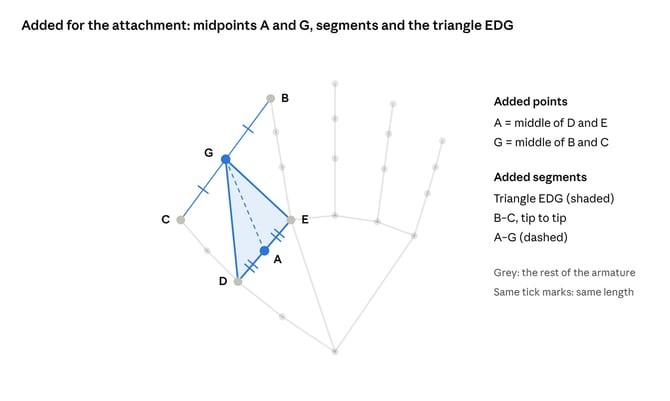
For convenience, some geometry is added on top of the armature:
- A is the middle of D and E.
- G is the middle of B (index tip) and C (thumb tip).
- The triangle EDG gives the plane used to orient the gripper.
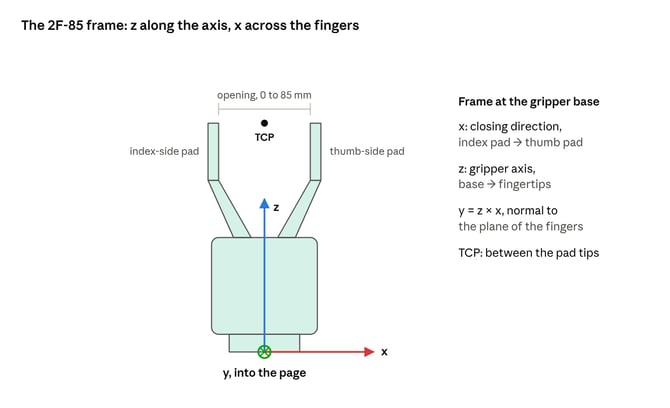
The 2F-85 frame is placed at the gripper base: z runs along the gripper axis toward the fingertips, x is the closing direction, and y is normal to the plane of the fingers. The TCP sits between the pad tips.
Once the armature is detected, place the virtual gripper with these four rules:
- Make the gripper XZ plane parallel to the EDG plane.
- Match the tip of the thumb-side gripper pad with the tip of the thumb (C).
- Keep an angle of 110° between the gripper axis (z) and the D to E direction.
- Place B in the plane of the index-side gripper pad. This sets the gripper opening.
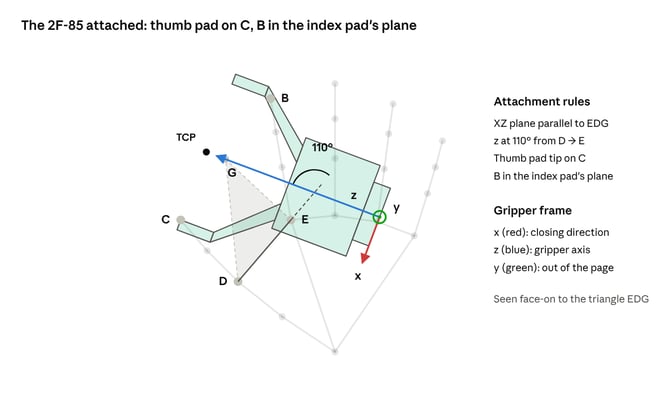
Tip: the 110° angle may need adjusting. It worked well with the hand armature from a VR headset's hand tracking, so it is a good value to start with.
If the hand opening (CB) is larger than the maximum gripper opening, the index tip ends up outside the plane of the gripper pad.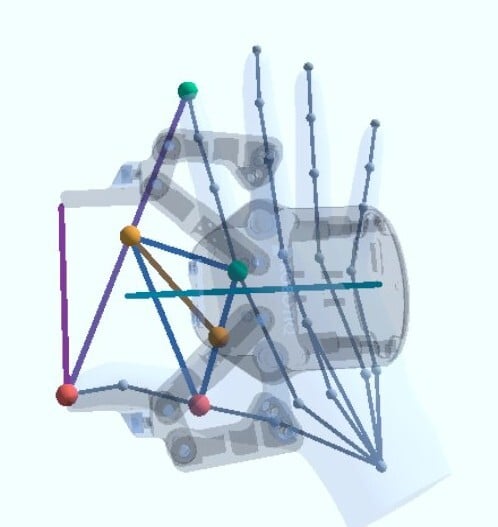
The method makes deliberate trade-offs to keep the gripper orientation stable, because a robot cannot follow sudden orientation changes:
- The index tip does not match the tip of the gripper finger. Forcing them to match would make the gripper orientation unstable, especially when the fingers are close to each other. In practice this matters little: when you close your fingers, the index and thumb tips naturally meet, so a hand configuration where they do not is rare.
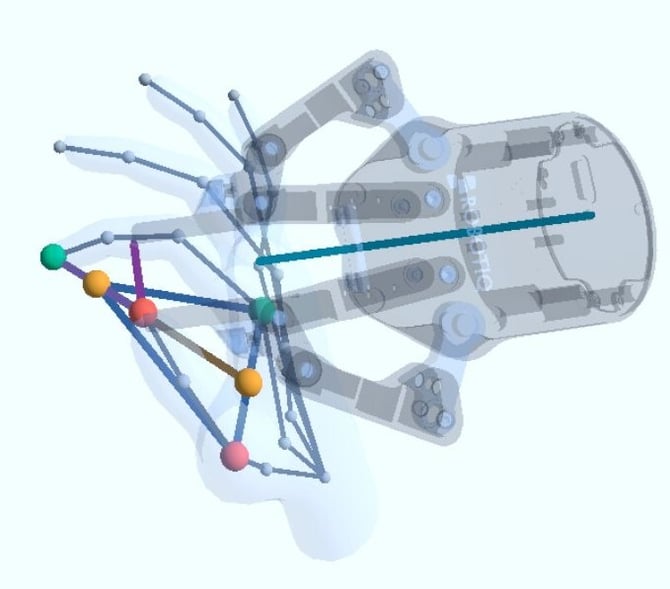
- The gripper can appear to "fly above the hand". When the thumb tip is not in the DEG plane, the gripper looks attached to the thumb only. Placing the gripper in the CBA plane would follow the fingers more closely, but it makes the gripper unstable around its Z axis when the fingers are close together. This only happens when the thumb is in an uncomfortable position, which is rare.
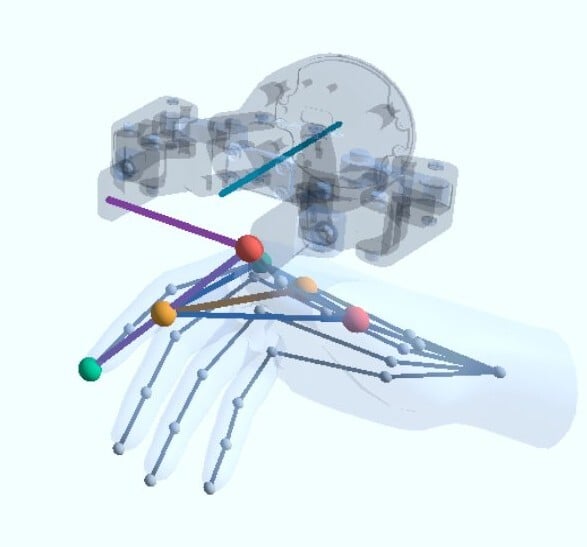
- The method assumes a grasp between the thumb and the index. This covers most of the way people pick objects, but humans also use more sophisticated grasps. For those, the method still produces a gripper configuration, but it may not be suited to performing the same manipulation.
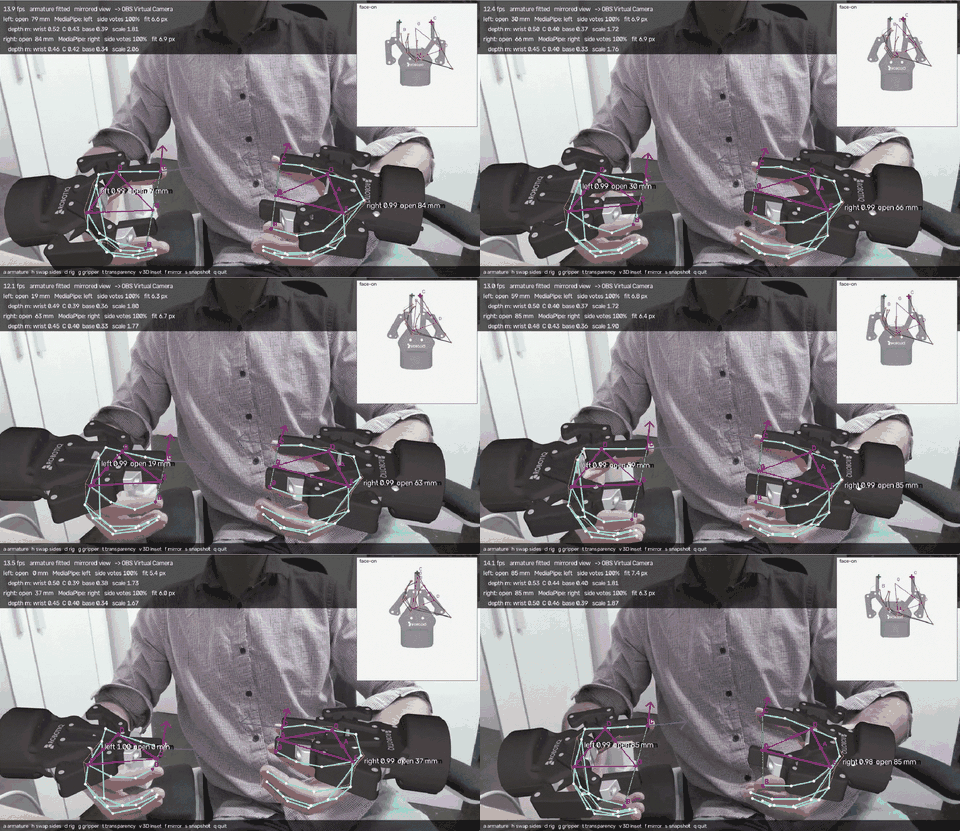
Gripper attached to hands detected on a webcam video.
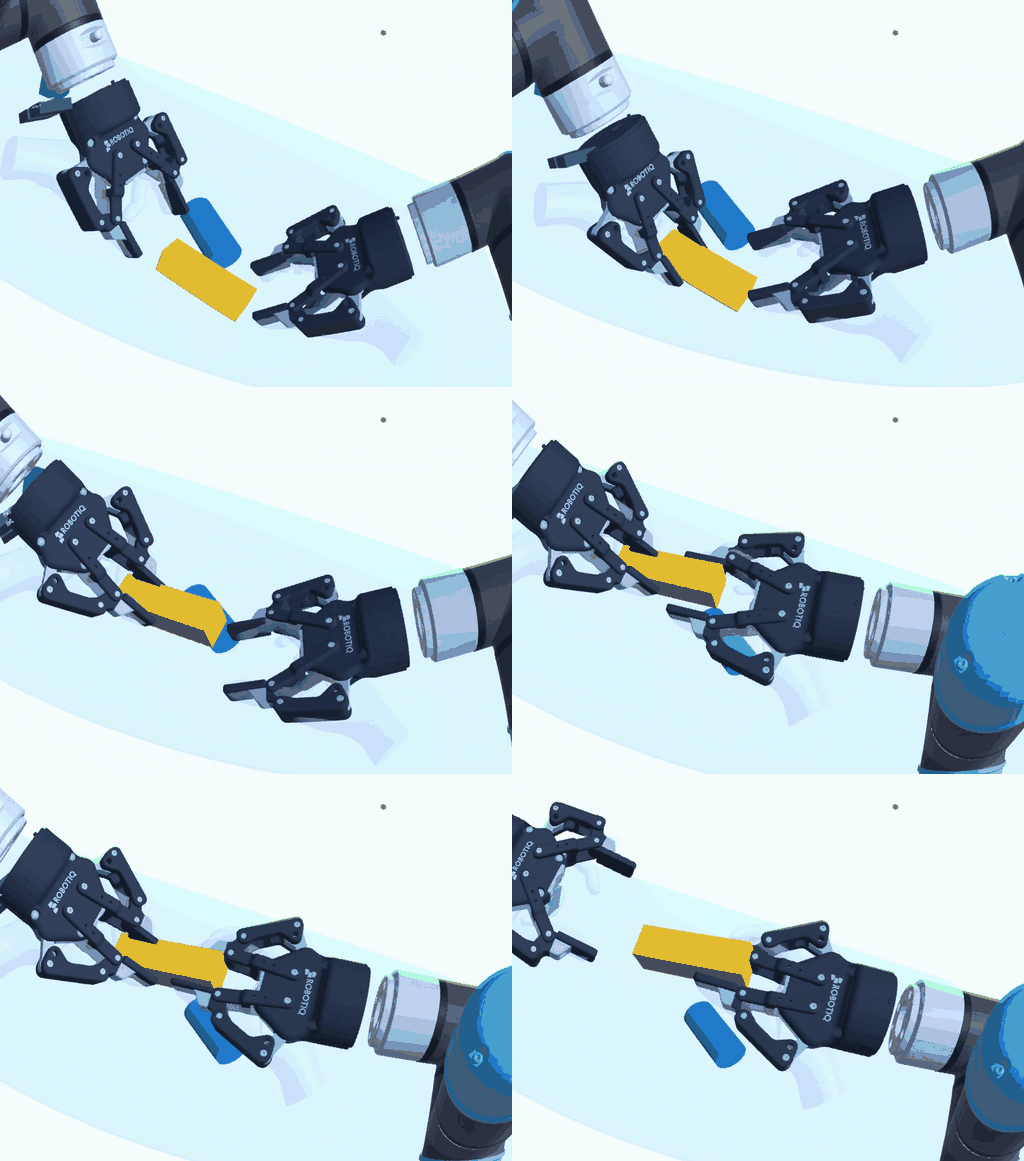
Gripper attached to the hand armature from a VR headset.
ConclusionAttaching a virtual 2F-85 to a detected hand armature turns any recording of human hands into gripper poses and openings, a simple bridge between how people manipulate objects and how a robot can reproduce it. To see how Robotiq components fit a physical AI application, read Order preparation application with Robotiq components, or check out the 2F-85 adaptive gripper.
Need help? Contact Robotiq Support.
Updated: November 18, 2026